Common LC Panel Issues and How to Troubleshoot Them for Stable Fiber Performance
You know that moment when a fiber link slows down, and everyone starts blaming the switch, the cables, or the universe. The real trouble often sits quietly inside the LC panel. A tiny speck of dust, a faulty connector, a worn adapter, and the whole thing starts acting strangely.
That is why this guide walks through the messy parts of LC panel problems and how you fix them before your network feels like it is dragging its feet. The goal is to keep everything simple enough for busy teams, yet detailed enough for individuals who manage real fiber work on a daily basis.
Common LC Panel Issues You Need to Watch For
Sometimes people assume fiber fails only during big outages, but most problems grow slowly. A faulty adapter here. A bent cable there. It all stacks up. So, let’s break down the big ones.
1. Dirty or Contaminated LC Connectors That Reduce Optical Quality
A dirty connector ruins a good link faster than anything else. You see the light dancing wrong, the speed dropping, and the packets retrying. It is annoying because the connector may look clean from a distance. Cleaning becomes a tedious task that everyone knows but nobody enjoys. Still, a dirty LC port creates higher loss and strange jitter that shows up during real heavy traffic.
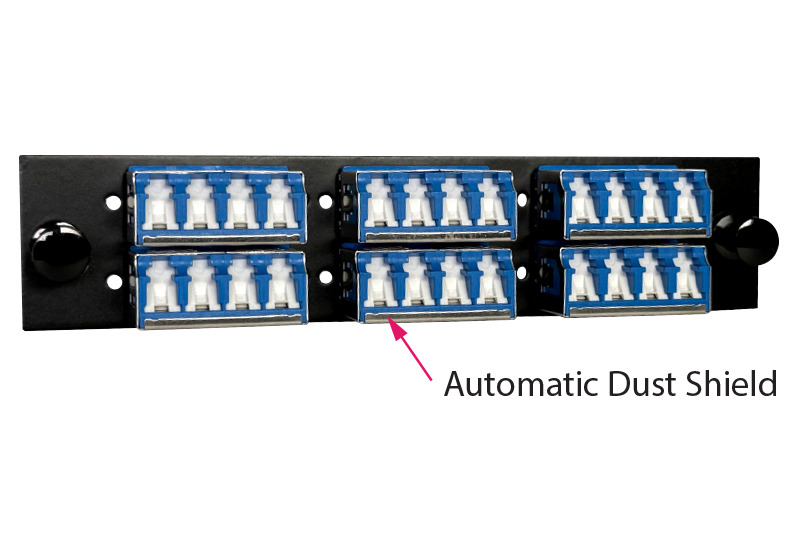
Some teams choose stronger plates similar to the ones from SanSpot because the tighter sleeve alignment reduces wear during frequent patch cycles.
Dust sticks to the ferrule. Skin oil transfers easily. Airflow inside racks pushes particles into open ports. Many US teams skip cleaning during rush jobs, and the network takes the hit later. The best thing is to clean each connector before patching. But that rarely happens without discipline.
Quick notes before moving on:
● Missing dust caps
● Poor cleaning habits
● Traffic spikes caused by the loss
2. Polarity Mismatch Problems That Disrupt TX and RX Alignment
Polarity mistakes are like putting the left shoe on the right foot. Nothing feels right. When TX and RX are reversed, devices talk into the void. New technicians flip the connectors without checking. Older racks hold mixed polarity methods from past builds. And sometimes the documentation exists only in theory.
You plug in a patch cord, and the port stays quiet. No link. No life. It looks like a hardware failure. But it is only a reversed path. So the first step is always to look at polarity before blaming anything else. And trust me, technicians in big US facilities run into this issue weekly.
3. Excessive Bend Radius or Cable Stress That Causes Signal Loss
Cables bend and twist when racks get crowded. People squeeze panels into tight spots. Someone pulls a cable too hard. You know the drill. Fibers break slowly. Or they shed light on tight curves. That creates loss that feels random. One day, everything is fine. The next day, a small movement knocks the link out.
It happens behind switches, under trays, and in the back of an LC panel, where things get messy. A little discipline with routing can save you countless hours. But routing takes time, and people rush.
Here is a quick comparison table that shows how bends affect different cable types.
Fiber Type | Safe Bend Radius | Common Failure Signs | Risk Level |
~30 mm | Sudden drop in light | High | |
~28 mm | Patchy throughput | Medium | |
~25 mm | Small bursts of loss | Medium |
4. Damaged or Worn LC Adapters Inside the Panel
Adapters age like everything else. The ceramic sleeve inside loosens. The latch feels weak. Slight pressure breaks the alignment. People plug and unplug often, and the adapter starts giving up. Old data centers in the US face this more because panels stay in service for a decade.
You wiggle a cable, and the link dies. That is an adapter screaming for retirement. It is a simple fix, but easy to miss because the adapter looks fine from the outside. Replacing plates before they fail prevents confusion later.
5. Mixing UPC and APC Connectors Leading to Severe Loss
This one is a classic. UPC is blue. APC is green. Everyone knows it. Yet mix-ups happen because patch cords pile up or because teams borrow cables from other rooms. A UPC connector against an APC sleeve gives terrible return loss. The link behaves as if it is underwater.
People push the connector in anyway, thinking it will work. It does not. And it also scratches both connectors. So it is not just a performance issue but also a hardware damage issue.
How to Fix LC Panel Problems
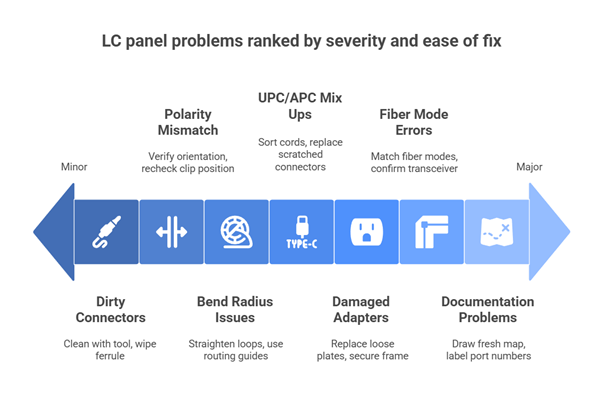
Dirty or Contaminated LC Connectors
● Clean the connector with a one-click tool and wipe the ferrule gently until it displays a clear surface, allowing the light to pass with fewer losses during daily usage.
● Inspect both ends with a small fiber scope to confirm the core remains clean, as any leftover dust can quickly lower the quality.
● Replace scratched cords immediately, as damaged ends can continue to affect the LC panel even after cleaning and testing.
● Seal unused ports to stop dust from entering the adapter sleeves and ensure the ferrules remain clean during heavy workloads or fast patching cycles.
Polarity Mismatch
● Follow the original polarity path and verify TX and RX sit in the right orientation so signals travel correctly.
● Recheck duplex clip positions because a simple flip often fixes silent link failures without deeper testing.
● Use a polarity tester when links stay dead, as it clearly shows the pair direction and avoids wasted time.
● Label every corrected path to prevent future mix-ups as racks become busy with new devices and quick patch jobs.
Bend Radius Issues
● Straighten tight loops gently to prevent light from leaking out of the fiber core during movement.
● Use routing guides to support the cable path and avoid pressure points that can slowly weaken the strands.
● Add slack in stressed areas because stretched fibers break alignment and create sudden drops.
● Keep heavy bundles away from thin fibers to prevent crushing or bending that harms signal strength.
Damaged LC Adapters
● Replace loose adapter plates since weak sleeves misalign the ferrules even when everything looks normal.
● Check for cracks around the sleeve area, as small breaks can cause significant drops under load.
● Secure the adapter frame tightly so the connectors stay stable during maintenance or movement.
● Select stronger plates, similar to those offered by SanSpot, to reduce wear during frequent patching.
When replacing older adapter plates, it is helpful to select stable hardware made with firm ceramic sleeves, such as the LC panel options offered by SanSpot, as this enhances durability and reduces alignment failures.
UPC and APC Mix Ups
● Sort UPC and APC cords clearly, as mixing them creates return loss that disrupts stable communication.
● Replace scratched connectors as both ends lose quality after incorrect mating.
● Train teams to check color codes before patching, so mistakes drop and speed stays stable.
● Label APC and UPC storage areas to ensure visual separation, as this prevents common handling errors.
Fiber Mode Errors
● Match all fiber modes carefully so OM3 connects with OM3 and OS2 connects with OS2 to avoid sudden performance loss.
● Confirm the transceiver type before patching, as different optics require specific fiber modes.
● Use correctly color-coded cables that match the panel and prevent hidden mismatches.
● Replace the incorrect cord quickly when links display odd errors or slowdowns.
Documentation Problems
● Draw a fresh map after each update because clear mapping shortens future repairs.
● Add readable port numbers on both sides to avoid confusion when racks grow.
● Label each fiber end to ensure accurate direction and pairing information.
● Store all diagrams in a single shared location to prevent old notes from conflicting with new plans.
Why Choose SanSpot for High Quality LC Panels and Fiber Infrastructure
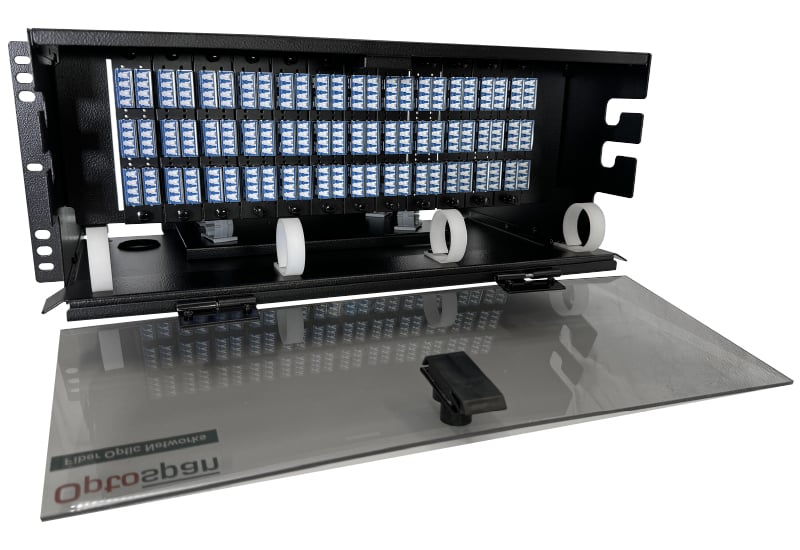
Fiber panels feel the pressure of daily work. So choosing the right hardware helps reduce problems before they grow. That is where SanSpot makes a real difference because the build quality supports stable alignment and durable adapter sleeves. Many US teams prefer the modular design because it fits cleanly inside dense racks.
The LC panels from SanSpot withstand heavy use, regular patching, and extended operational cycles without compromising accuracy. And the stable mechanical structure helps reduce troubleshooting time. You find that good hardware cuts the effort you spend on maintenance. The low-loss design from sanSpot supports smooth signals even when networks expand.
Because LC connectors now account for approximately 35.43 percent of the entire fibre connector market, the LC panel space is experiencing increasing stress each year. This is one reason teams choose stronger hardware from SanSpot to handle heavy daily workloads without problems.
Final Thoughts
Good fiber performance depends on careful management of the LC panel. When dust grows, or when polarity flips, the whole network reacts. Now you know the common problems that often arise and the simple steps to resolve them. Cleaning helps. Cable routing helps. And using quality hardware protects your long-term performance.
If you want smoother workflows, start improving the panel today. Explore options from SanSpot, check your current installation, and take time to build a cleaner and stronger fiber layout that works without stress.
FAQs
1. Why does my LC connector lose signal sometimes
LC connectors lose signal when dust blocks the ferrule or when the cable bends too tightly. A small crack also hurts performance. Cleaning helps fix simple issues. If the link still fails, replace the patch cord.
2. How often should I clean LC connectors
Most teams clean before every reconnection. High traffic racks need cleaning weekly because airflow carries dust. A quick inspection helps avoid long outages. One-click cleaners make the job easier.
3. Why does polarity matter in LC panels?
Devices talk through TX and RX. If they flip, nothing works. A polarity issue looks like a dead port. Fixing it takes only a moment when you confirm the right path. Always label after you repair it.
4. How do I know if my LC adapter is worn out
A worn adapter feels loose or wobbly. The link drops when you move the cable. Old adapters crack with age. If you see these signs, replace the plate before the link fails again.
5. Can UPC and APC connectors work together
No. They do not match. Mixing them hurts performance and can scratch both ends. Always separate UPC and APC cords. Color coding helps avoid mistakes.
6. What causes fiber mode mismatch
Using OM3 with OS2 or OM4 with OS1 triggers mode errors. The link feels unstable. Always check the color and match mode to the transceiver type. Replacing the wrong cord solves it fast.